Playback Fail — automatic audio failover for live shows
When your primary playback machine dies mid-show, Playback Fail has already switched your console to the backup. Reaction time: a few tens of milliseconds. Price: £20 per Mac, 14-day free trial.
Download free trial Buy a licence — £20
macOS 11 or later · Apple Silicon and Intel
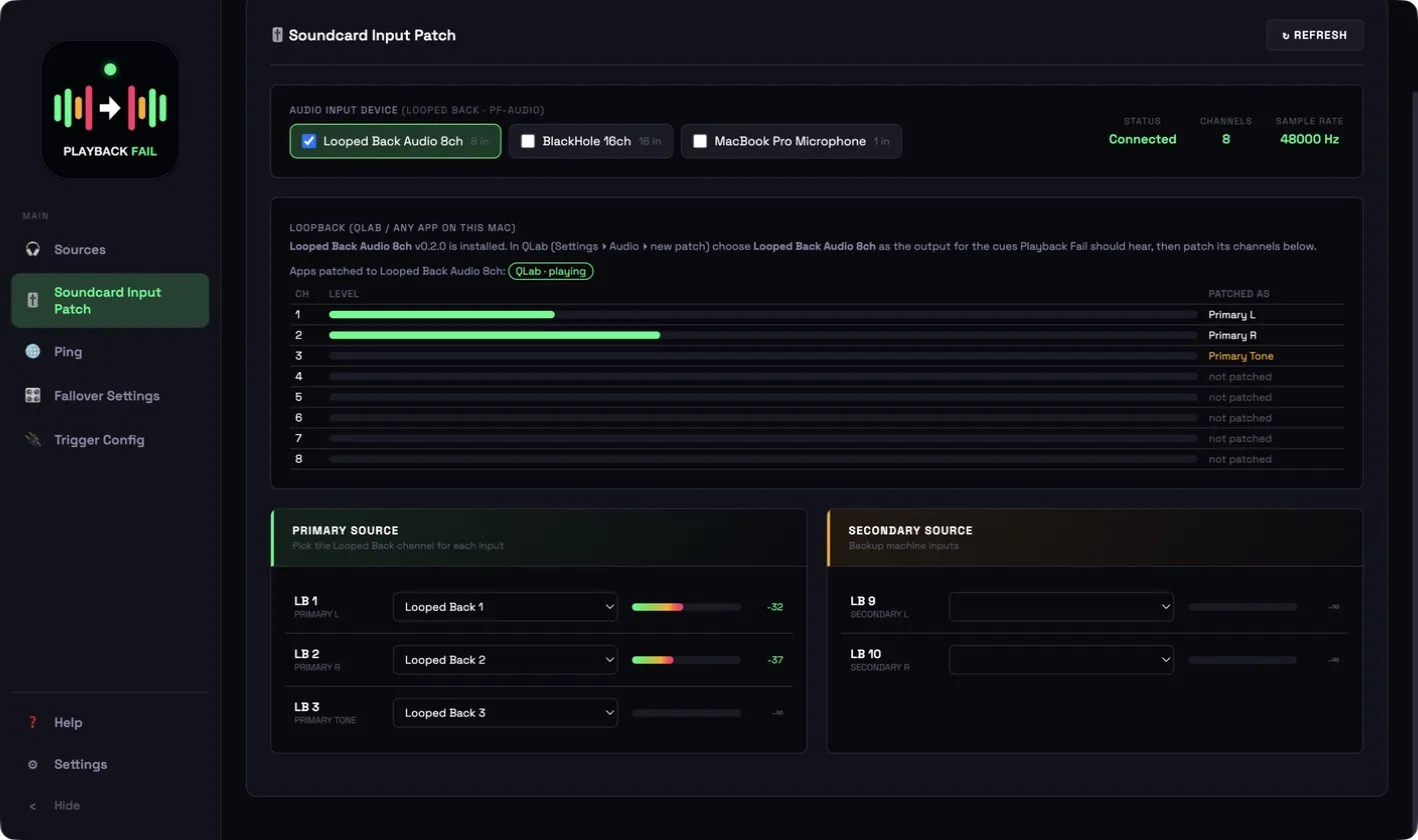
Playback Fail 1.2.9 — the Soundcard Input Patch page, with QLab playing into the bundled Looped Back Audio device.
How it works
Playback Fail does not guess whether your show audio has stopped — it watches a pilot tone.
1. The primary plays a pilot tone
Your primary playback machine plays a continuous 1 kHz tone on a spare channel alongside the show audio. Test-tone files are included.
2. Playback Fail listens
It watches that channel inside the audio engine, on every millisecond of audio. Tone present means the primary is alive and nothing happens.
3. Tone gone → fallover
If the tone disappears for longer than the timeout (from 10 ms), it sends mute commands to your console: backup channels unmuted first, then main channels muted — so there is never a gap on air.
4. Tone back → reset
Optionally it switches straight back when the tone returns, or you reset to main manually when you are ready.
Measured, every time
After each event the app shows the real figures: engine saw loss after 26 ms, backup live +31 ms, main back +18 ms.
Level-match alert
Always on: if the backup isn't sitting at the same level as the main, or is carrying no audio, an amber warning appears before it matters.
Dante, or a single Mac
Dante mode. Primary and backup are separate machines on a Dante network; Dante Virtual Soundcard on the Playback Fail Mac receives the channels. Dante is used as clock master and everything else follows its sample rate.
Loopback mode. QLab (or any app) runs on the same Mac as Playback Fail. The bundled Looped Back Audio 8ch virtual device — our own user-space CoreAudio driver, no kernel extension — carries the audio from the app straight into Playback Fail. Installed from inside the app in one click.
Mix the two: QLab on this Mac via Looped Back for the primary, the backup machine arriving over Dante. Playback Fail builds a combined input device automatically and keeps the patch pointing at the same physical channels if devices come and go.
Talks to your console
Fallover commands go out as MIDI over TCP/IP, or as GPIO pin changes.
Allen & Heath
SQ, dLive, Avantis, AHM, Qu, CQ — presets for the A&H TCP MIDI port (51325); AHM uses Note On mutes, SQ/dLive/Avantis use NRPN.
Behringer / Midas, Yamaha, Soundcraft
Presets set the port and message format; up to six mute/unmute commands per side, with Test Mute ON / OFF buttons to prove the console reacts.
GPIO
For consoles and systems that take contact closures instead of network MIDI.
Cue Relay for lighting
Network cues (UDP OSC from QLab to Eos, grandMA3, MagicQ, Hog 4, Titan, Onyx, Lightkey) normally stop when the primary dies. Playback Fail relays only the live machine's cues to the lighting desk, and can send a notify message on every switch.
Ping
Health checks for the primary, the backup and the console, from either playback machine.
Sidebar view
A 1×4 strip or 4×1 bar that sits beside QLab and pulses red on fallover, with LX cue flashes for each source.
Pricing and licensing
£20 per Mac, once
No subscription. A licence key (PBFL-…) activates one Mac; deactivate to move it. Includes the Looped Back Audio 8ch driver at no extra charge.
14-day free trial
Every new install gets a full 14-day trial, recorded against the Mac's hardware ID. The remaining days show on the Trial chip.
Updates included
The app checks for updates on launch and installs them with one click. Needs to be online once every 40 days to re-validate the licence.
Buy a licence — £20 Read the user manual
Bought a key? Open Playback Fail ▸ Settings ▸ About ▸ Licence, enter the key and your purchase email, and click Activate.
Requirements
- macOS 11 or later, Apple Silicon or Intel. Allow Microphone access on first launch — that is how the app listens to audio inputs.
- A console that accepts MIDI mute messages over TCP/IP, on the same network as the Mac.
- Dante mode: Dante Virtual Soundcard (licensed separately by Audinate) and a wired network connection.
- Loopback mode: nothing extra — the Looped Back Audio driver is included.
Questions before you buy?
Built by a live-sound company for its own shows. Ask us anything about your setup.
Email info@soundanalysts.co.uk Call 01483 715300